The Complete NAS RAID Guide: Secure Your Data & Performance (2026)
The Complete NAS RAID Guide: Secure Your Data & Performance (2026)
I. Introduction: The “Last Line of Defense” for Data Security
For every user who entrusts family photos, work documents, or enterprise data to a NAS (Network Attached Storage), hard drive failure is never a question of “if” but “when.” This NAS RAID guide starts with a simple truth: the Mean Time Between Failures (MTBF) for mechanical hard drives is often advertised as exceeding one million hours, which sounds reassuring, but that figure applies only under ideal laboratory conditions. In real-world environments, factors such as vibration, temperature fluctuations, and unstable power supplies accelerate drive aging. More importantly, every hard drive has a finite lifespan—you simply don’t know when it will reach its end.
This is precisely why RAID (Redundant Array of Independent Disks) has become the most critical “first line of defense” in NAS deployments. The essence of RAID is not backup, a common misconception. RAID addresses the core issue of “availability”: when a hard drive fails, your data remains accessible, your services continue uninterrupted, and you do not need to immediately restore an entire system from a backup. Backup serves a different purpose—it protects against catastrophic events such as accidental deletion, ransomware attacks, fire, or device theft. Simply put, RAID ensures “system uptime,” while backup ensures “permanent data preservation.” Both are indispensable.
This is also why, when users set up a new NAS (such as popular models like the N41), the very first step the system prompts is the selection of a RAID type. This choice directly determines your storage capacity utilization, read/write performance, and fault tolerance. Moreover, once an array is created, later modifications often entail significant risk and time investment. Therefore, truly understanding RAID is a fundamental skill for every NAS user.
II. Fundamentals: Deconstructing the Underlying Logic of RAID
1. Three Core Concepts
All advanced RAID functionalities are built upon three foundational technical concepts. Understanding these three is a prerequisite for comprehending any RAID level in this NAS RAID guide.
Striping is the core mechanism for enhancing performance in RAID. Its principle is straightforward: a contiguous stream of data is divided into fixed-size chunks (e.g., 64KB or 128KB) and then written alternately across multiple physical drives in the array. For instance, when the system needs to write a 1MB file, it splits the file into multiple chunks and writes them sequentially to Disk 1, Disk 2, up to Disk N, achieving N-fold I/O parallelism. This means read and write operations can occur simultaneously across multiple drives, theoretically delivering up to N times the performance of a single drive. However, striping alone provides no data redundancy; if any single drive in the array fails, all data in the entire array becomes unrecoverable.
Mirroring is the most direct method for providing data redundancy in RAID. Its principle is equally simple: every time a data block is written, the system simultaneously writes that same block to two (or more) independent physical drives. When one drive in the array fails, the complete data copy on the mirrored drive remains available, allowing the system to seamlessly read from the healthy drive with minimal service interruption. The primary advantages of mirroring are high reliability and extremely low recovery complexity—after replacing the failed drive, simply copying all data from the healthy drive to the new one completes the rebuild. The obvious trade-off is that usable capacity is only 50% of total raw capacity, effectively doubling the cost.
Parity is the key to achieving a balance between storage efficiency and data security in RAID. Taking RAID 5 as an example, it uses XOR (exclusive OR) operations to generate parity information. XOR has an elegant mathematical property: if A XOR B = P, then A XOR P = B, and B XOR P = A. This means that knowing any two values allows you to deduce the third. RAID 5 leverages this property: in a 3-drive RAID 5 array, the parity block P = Data Block A XOR Data Block B. If any single drive fails, the missing data can be reconstructed by XORing the remaining data block and the parity block from the surviving drives. This approach sacrifices the capacity of only one drive for parity information while achieving single-drive fault tolerance, significantly improving storage efficiency.
2. Comparison of Common RAID Levels
With these three building blocks—striping, mirroring, and parity—we can construct various RAID levels. Below is a comparison of the most common mainstream RAID levels and their characteristics:
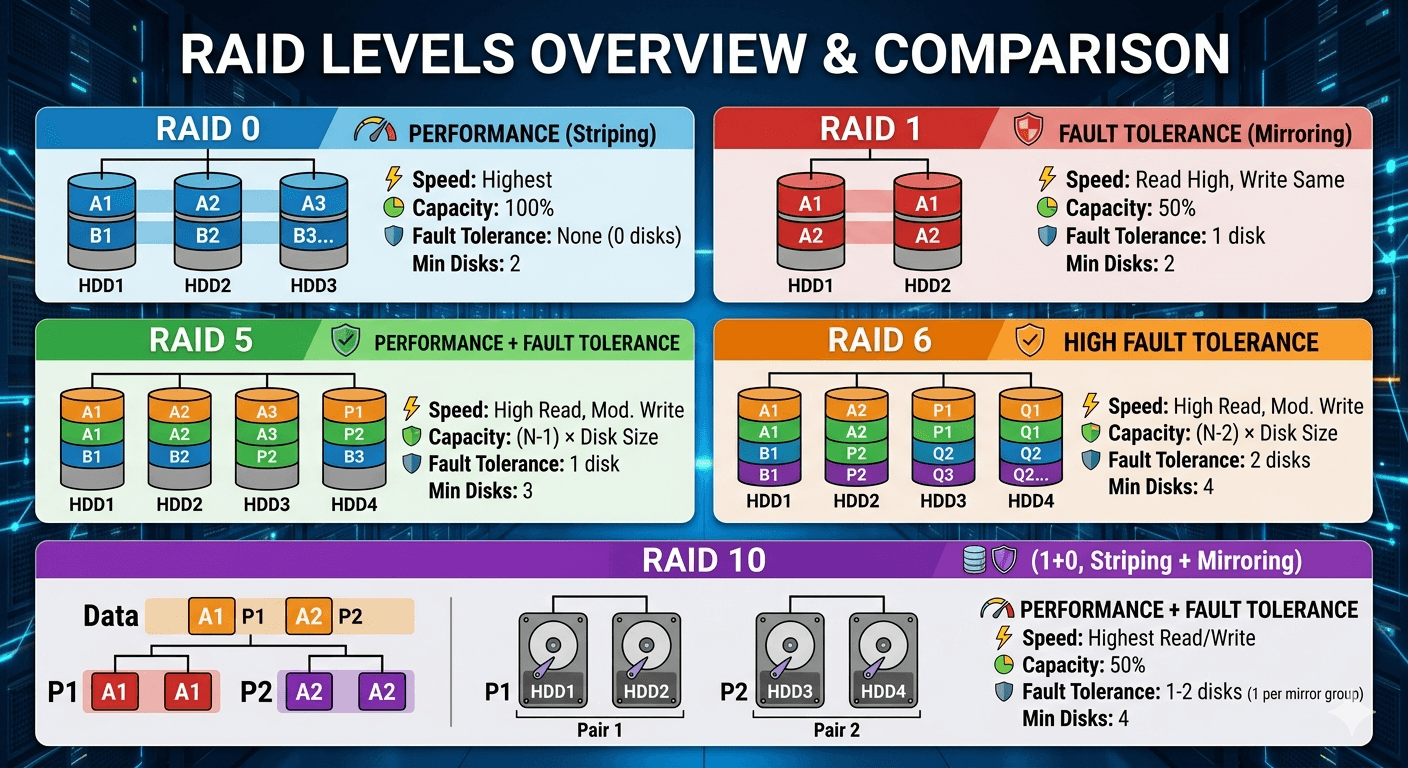
- RAID 0 (Striping) — The ultimate performance purist. It performs only striping with no redundancy. Minimum 2 drives required, 100% usable capacity, excellent read/write performance. The cost is zero fault tolerance: failure of any single drive results in total data loss across the entire array. Suitable only for scenarios where data is disposable, such as video editing caches or temporary render workspaces.
- RAID 1 (Mirroring) — Focused entirely on reliability. Data is fully mirrored onto two drives. Minimum 2 drives required, 50% usable capacity. Read performance is excellent (data can be read from either drive), write performance is equivalent to a single drive. Tolerates failure of 1 drive. This is the nearly singular rational choice for 2-bay NAS users.
- RAID 5 (Distributed Parity) — Once the “gold standard” for home and SMB environments. It strikes a good balance between performance and reliability. Minimum 3 drives required, sacrificing the capacity of 1 drive for parity, so usable capacity is (N-1) × single-drive capacity. Read performance is excellent (close to RAID 0), but write performance is relatively lower due to the need to calculate and write parity information for each write operation. Tolerates failure of 1 drive. However, in the era of high-capacity drives, the rebuild risks of RAID 5 are increasingly scrutinized.
- RAID 6 (Dual Parity) — The “enhanced version” of RAID 5. It introduces dual parity (typically using Reed-Solomon codes), capable of tolerating the simultaneous failure of two drives. Minimum 4 drives required, sacrificing the capacity of 2 drives. In arrays with large-capacity drives (10TB+), RAID 6 is gradually replacing RAID 5 as the more prudent choice.
- RAID 10 (Mirroring + Striping) — The “performance monster” and “enterprise-grade choice.” It first creates mirrors (RAID 1) and then stripes across the mirror pairs (RAID 0), combining the advantages of both. Minimum 4 drives required, usable capacity is 50% of total raw capacity. Read and write performance are both outstanding, rebuild times are fast, and the array remains functional as long as not both drives within the same mirror pair fail simultaneously. Ideal for scenarios such as virtual machines, databases, and high-intensity video editing.
III. Advanced: Proprietary Innovations from Major NAS Vendors
Standard RAID technology has been around for decades, and its limitations have become increasingly apparent. Traditional RAID expects uniform drive capacities; mixing drives of different sizes results in alignment to the smallest capacity, wasting space on larger drives. Furthermore, traditional RAID has inherent shortcomings in addressing issues like “silent data corruption” and the “write hole.” Consequently, major NAS vendors and the open-source community have developed their own improved solutions.
1. Synology — The King of Flexibility: SHR (Synology Hybrid RAID)
Synology introduced Synology Hybrid RAID (SHR) alongside DSM 2.3 in 2010, fundamentally simplifying the complexity of RAID configuration. The core pain point SHR addresses is that traditional RAID demands uniform drive capacities, whereas home users often possess a mix of older drives of varying sizes. Enforcing traditional RAID would result in significant wasted capacity.
The technical implementation of SHR is quite clever. Under the hood, it leverages Linux’s mdadm (software RAID) and LVM (Logical Volume Manager). Each physical drive is partitioned into smaller allocation units (based on the smallest drive in the array). Multiple RAID arrays are then automatically created across these slices, and LVM aggregates these sub-arrays into a unified storage pool.
Example: Suppose you have a 4-bay NAS with two 2TB drives and two 6TB drives, totaling 16TB raw capacity. Traditional RAID 5 would “trim” all drives to 2TB, yielding only 6TB usable (4×2TB – 1×2TB parity = 6TB), wasting 10TB. SHR, however, first creates a RAID 5 array using the first 2TB of all four drives (yielding 6TB usable), then creates a RAID 1 array using the remaining 4TB on the two 6TB drives (yielding 4TB usable). Finally, LVM merges these sub-arrays into a single volume, providing a total of 10TB usable space.
In terms of RAID level equivalence: 2-drive SHR corresponds to RAID 1; 3 or more drives with SHR corresponds to RAID 5; SHR-2 corresponds to RAID 6, tolerating the failure of two drives simultaneously. While SHR has its critics (the multi-layer structure can complicate data recovery compared to traditional RAID), its value is undeniable for scenarios involving mixed drive capacities.
2. QNAP — Performance and Cutting-Edge Tech: Qtier and ZFS
QNAP’s innovations in RAID technology focus on two primary directions: Qtier intelligent tiered storage within the QTS operating system, and the deep embrace of the ZFS filesystem in the QuTS hero operating system.
Qtier Auto-Tiering is QNAP’s most distinctive proprietary technology. The core idea is that not all data is created equal. Newly created data (e.g., documents currently being edited, recently taken photos) is accessed frequently and is considered “hot data.” In contrast, archived project files from six months ago may be accessed only rarely and are considered “cold data.” Qtier uses I/O-aware algorithms to automatically migrate frequently accessed hot data to the SSD tier, while cold data resides on the HDD tier. Real-world testing shows that this technology can increase SSD utilization by 60% and reduce overall storage costs by 40%. Unlike traditional SSD caching, Qtier is true tiered storage; the primary copy of the data dynamically migrates between tiers.
QuTS hero and ZFS represent QNAP’s alternative product line aimed at enterprise users and hardcore enthusiasts. QuTS hero is built upon the ZFS filesystem. Its RAID-Z (equivalent to RAID 5) and RAID-Z2 (equivalent to RAID 6) fundamentally resolve several longstanding issues with traditional RAID. The most critical improvement is the elimination of the “write hole.” ZFS, through its copy-on-write mechanism and variable stripe width design, ensures that all write operations are complete stripe writes, inherently preventing data inconsistency caused by power interruptions. Additionally, ZFS features end-to-end checksumming, which can automatically detect and repair “silent data corruption” (where a drive returns erroneous data without reporting an error, a scenario traditional RAID is blind to).
3. ZFS RAID Types: A Comprehensive Overview
Before diving into the DIY and open-source realm, it is essential to have a clear understanding of the specific RAID configurations that ZFS offers, as they differ in nomenclature and implementation from traditional RAID levels.
- RAID-Z1 (RAID-Z) — The ZFS equivalent of RAID 5. It uses single parity and stripes data across the drives in the vdev (virtual device). Minimum 3 drives required (though 2 drives with parity is possible, it’s not recommended). It can tolerate the failure of any single drive without data loss. Usable capacity is (N-1) × single-drive capacity.
- RAID-Z2 — The ZFS equivalent of RAID 6. It employs double parity, distributing two parity blocks across the drives. Minimum 4 drives required. It can tolerate the simultaneous failure of any two drives. Usable capacity is (N-2) × single-drive capacity. Given the growing size of modern HDDs, RAID-Z2 is increasingly recommended for home and small business NAS deployments.
- RAID-Z3 — A ZFS-specific level with triple parity. Minimum 5 drives required. It can survive the failure of any three drives. This provides an extraordinary level of fault tolerance, often used in large-scale, high-availability enterprise storage systems where data integrity is paramount and rebuild times with large drives are a concern. Usable capacity is (N-3) × single-drive capacity.
- Mirror vdev — The ZFS equivalent of RAID 1, but with the ability to add multiple mirror pairs (similar to RAID 10 when striped). In a mirror vdev, each drive is an exact copy of another. You can add multiple mirror vdevs to a pool, and ZFS will stripe data across them. This configuration offers excellent read IOPS and extremely fast resilvering (rebuilding) because the entire contents of a healthy drive are simply copied to the replacement drive, without the need for parity calculations. Minimum 2 drives per mirror vdev, but for optimal performance, pools are often built from multiple mirror pairs.
Key advantages of ZFS RAID include: protection against silent data corruption via checksums; the copy-on-write mechanism that eliminates the write hole; and features like snapshots, compression, and native encryption. However, ZFS requires careful planning, as adding drives to a RAID-Z vdev after creation is not as straightforward as traditional RAID expansion (though adding entire new vdevs to a pool is possible).
4. DIY and Open-Source (Linux/TrueNAS) — Hardcore Security: ZFS and mdadm
For users building their own NAS, two primary technical paths exist: software RAID using Linux’s mdadm, or the ZFS-based TrueNAS solution.
mdadm is the software RAID management tool built into the Linux kernel and serves as the underlying foundation for RAID implementations in systems like Synology DSM. Its greatest strength is exceptional compatibility—it is hardware-agnostic and does not depend on a specific RAID controller. Even if the entire NAS hardware fails, as long as the drives are connected to another Linux machine, the array can be reassembled using mdadm and data can be read. mdadm also supports a bitmap feature that tracks synchronized regions, dramatically reducing rebuild times after an unclean shutdown.
ZFS (including RAID-Z1, RAID-Z2, RAID-Z3, and mirrors) represents the ultimate integration of a filesystem and volume manager. It not only provides RAID functionality but also includes built-in data integrity verification, snapshots, compression, deduplication, and other advanced features. ZFS’s copy-on-write mechanism ensures data remains in a consistent state at all times. In systems like TrueNAS, ZFS has become the gold standard for DIY NAS builds, particularly suited for scenarios where data integrity is of the utmost importance.
IV. Practical Application: Which RAID Should I Choose for My NAS?
No matter how much theory you absorb, it ultimately boils down to one practical question: facing this NAS in front of me, which RAID should I actually choose? This NAS RAID guide provides a clear path forward.
1. Selection Recommendation Table
| Drive Bays | Recommended Configuration | Use Case and Notes |
|---|---|---|
| 2-bay | RAID 1 / SHR | Primary choice for family photos and document backups. Mirroring provides redundancy against single drive failure. If drives have different capacities, Synology SHR can maximize space utilization. |
| 4-bay and above (Large Capacity) | RAID 6 / SHR-2 / RAID-Z2 | Strongly recommended when using drives ≥10TB. Tolerates simultaneous failure of any two drives, offering significantly better rebuild safety than RAID 5. |
| 4-bay and above (Performance Focus) | RAID 10 / Mirrored vdevs (ZFS) | Ideal for virtual machines, databases, and 4K video editing. Delivers the highest read/write performance and fastest rebuild times. Usable capacity is 50%. |
| Mixed Capacity / Older Drives | SHR (Synology) / Qtier (QNAP) | Synology SHR flexibly utilizes drives of different sizes; QNAP Qtier can accelerate an HDD array using an SSD. |
2. Pitfall Avoidance Guide
Why is expansion the most dangerous time for hard drives? RAID expansion (adding a new drive or replacing drives with larger ones) requires rebuilding the array. This rebuild process subjects all drives in the array to prolonged, intensive read/write stress. If an older drive has latent issues (bad sectors, aging heads), the rebuild stress lasting hours or even days can be the final straw that causes it to fail. For RAID 5, if a second drive encounters a read error during this rebuild, the entire array can collapse mid-expansion. Real-world analysis from NAS vendor logs indicates that the probability of array collapse due to a power outage during RAID rebuild can be as high as 67%. Therefore, always perform a full SMART check on all drives before expansion and ensure backups are up-to-date.
Why should traditional defragmentation be disabled for SSD arrays? Defragmentation tools are designed for mechanical hard drives. With HDDs, fragmented files force the read/write head to move frequently, degrading performance, so periodic defragmentation helps. SSDs, however, have no mechanical parts; access latency is nearly uniform regardless of data location, meaning defragmentation yields negligible performance benefits. Worse, defragmentation involves extensive additional write operations to the SSD, accelerating NAND flash wear and shortening the drive’s lifespan. When creating an all-SSD array, ensure the operating system’s automatic defragmentation is disabled.
V. Beyond RAID: The Guardian Layers
1. The 3-2-1 Backup Principle
Let me reiterate: RAID is not backup. RAID protects against a single risk: hardware failure. The threats to your data extend far beyond that. Accidental deletion, ransomware, theft, fire, flood, or logical errors within the NAS system itself—any of these can lead to complete data loss within a RAID array, and RAID offers no defense against them.
This is why the 3-2-1 backup principle is the golden rule in any discussion of data security: 3 copies of your data (1 primary + 2 backups), on 2 different types of media (e.g., NAS + external hard drive + cloud storage), with 1 copy stored offsite (to protect against local disasters like fire or theft). With RAID, your data remains accessible when a drive fails; with a proper backup, your data can be restored from any disaster. Both are necessary; neither alone is sufficient.
2. Hardware Synergy
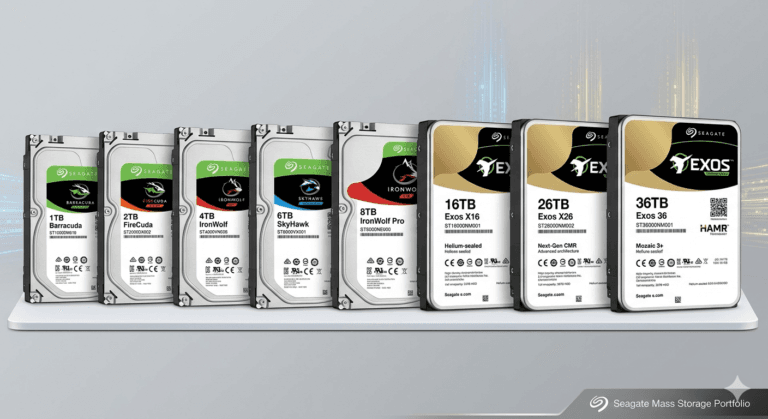
RAID stability depends on a favorable hardware environment. Multi-bay NAS units (like the popular N41 model) generate considerable heat when fully populated with drives, and high temperature is a leading killer of hard drives. Studies indicate that for every 5°C increase in operating temperature, the annual failure rate of a hard drive can rise by 10–20%. Therefore, choosing a NAS chassis with good thermal design, ensuring adequate ventilation, and regularly cleaning dust are critical measures to prolong drive lifespan. Additionally, using NAS-specific drives (e.g., WD Red, Seagate IronWolf) is crucial. These drives feature firmware optimizations and vibration compensation tailored for 24/7 operation in RAID environments, unlike standard desktop drives.
3. Stable Power: UPS is a RAID “Life-Saver”
If RAID is the first line of defense for data security, an Uninterruptible Power Supply (UPS) is the guardian of that line. During normal operation, a NAS uses write caching to improve performance—data is written to memory cache first and then flushed to disk. If power is suddenly lost, any data in the cache that hasn’t yet been written to disk is permanently lost, and files being written can become corrupted. Even more dangerous is that filesystem metadata (partition tables, directory structures) may be incompletely written, potentially rendering the entire storage pool unmountable, even if the drives themselves are physically intact.
During a RAID rebuild, the consequences of a power outage are even more severe. The array is in a “degraded” state, and data consistency relies on precise parity calculation and synchronization. A power loss at this moment, before parity is fully written, can cause RAID logic corruption and a high probability of array collapse. Configuring a UPS with communication capabilities (via USB or network) allows the NAS to detect a power outage and automatically initiate a safe shutdown procedure. The UPS doesn’t need to provide long runtime; it only needs a 10–30 minute window of power to allow the NAS to complete pending writes and shut down gracefully. This investment, often just a few hundred dollars, protects data of immeasurably greater value.
VI. Conclusion
RAID technology originated in a 1987 paper at the University of California, Berkeley, and has evolved over nearly four decades. From the earliest RAID 1 and RAID 5, through hardware RAID controllers to software RAID, and from traditional filesystems to ZFS, the technology has continuously advanced, yet its core mission remains unchanged: to construct a storage system across multiple drives that is more reliable and more performant than any single drive could be.
There is no perfect RAID array. RAID 0 pursues extreme speed at the cost of safety; RAID 1 guarantees data but sacrifices capacity; RAID 5/6 seeks a balance between space efficiency and security; RAID 10 delivers exceptional performance but demands a high hardware cost. Every choice embodies a set of trade-offs: performance, capacity, reliability, and cost. You cannot maximize all of them simultaneously.
As a NAS user, your task is not to find the “best” RAID, but to find the balance point that best suits your specific needs. If your data consists mainly of family photos and documents, RAID 1 or RAID 6/SHR-2/RAID-Z2 is likely the most prudent choice. If you are a video creator demanding maximum read/write speed, RAID 10 or mirrored vdevs warrant consideration. If you have a collection of mismatched hard drives, SHR can save you significant space.
Finally, remember this NAS RAID guide‘s core takeaway: RAID keeps your data accessible when a drive fails; backup ensures your data can be recovered from any disaster. Only with both in place can you truly rest easy.